
Manufacturing is already hard enough. Running the factory shouldn’t be.
From automated material allocation and real-time work order tracking, to advanced shop floor interfaces and employee clocking, DynamxMFG gives you complete control over production, stock, and reporting, so you can focus on manufacturing, not managing it.
Take a tour of DynamxMFG
Experience the platform that puts control in your hands.
Take control of your shop floor in 90 days
DynamxMFG is implemented using a low-risk roadmap designed to deliver fast visibility, prove value early, and then scale with confidence. Instead of a disruptive “big-bang” rollout, we start with one critical line, cell, or value stream and build from real shop-floor truth.
Days 0–30
Establish visibility and a trusted baseline
The first month replaces spreadsheet chaos and guesswork with a single source of live production data.
Days 31–60
Regain control and remove obvious waste
With live data in place, your team shifts from reactive firefighting to data-driven action.
Days 61–90
Prove the ROI and prepare to scale
The final phase of the deployment turns your operational improvements into financial evidence.
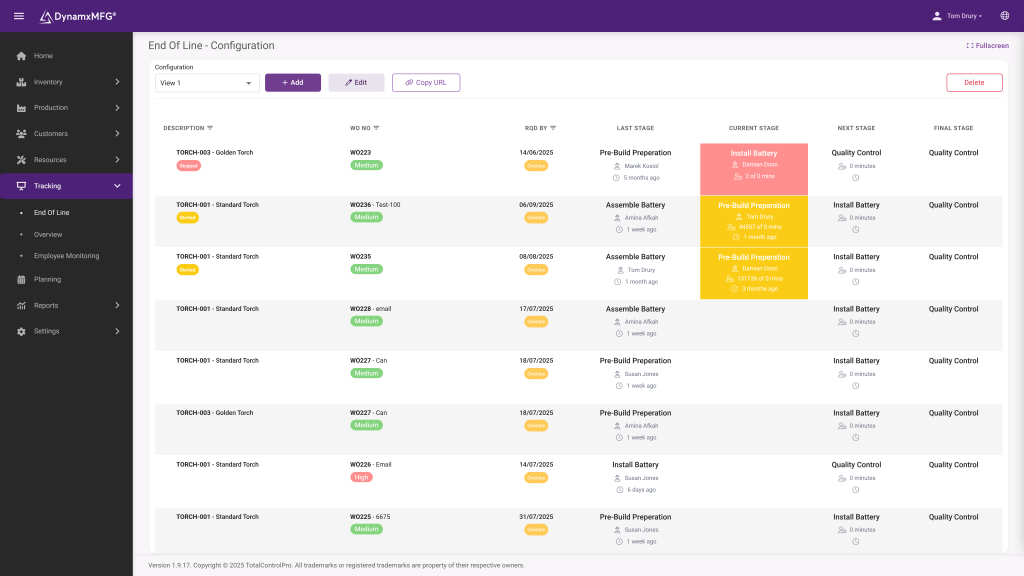
Live status from every operation, every machine, every operator
Operators clock in and pick up their next job from the Smart Worker Interface, a touchscreen-friendly shop floor interface. The moment they start an operation, the office sees it. The moment a job stops, the manager knows why.
Estimated vs actual times update live. Stoppage reasons are captured at source – not reconstructed afterwards. End-of-Line screens display live order status across the floor so everyone sees the same picture, from the office to the bench.
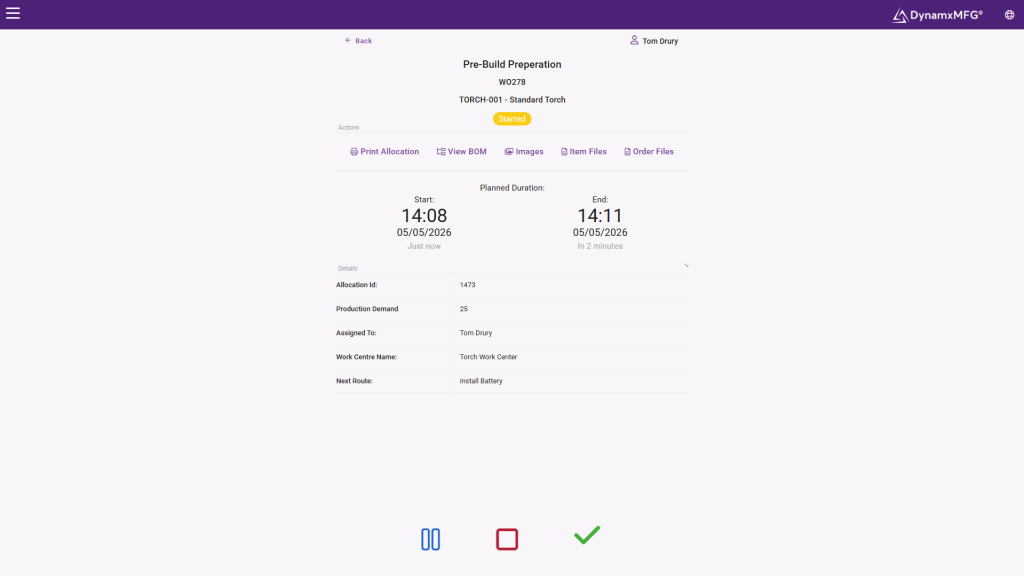
Operators start and complete jobs with a tap or a scan
The Smart Worker Interface runs on any touch screen device – tablet, dedicated terminal, or shared workstation. Employees log in with their employee number, PIN, or by scanning their QR badge. One tap starts the job. Another completes it. Time records automatically.
Scan Station mode lets operators track entirely by QR code – scan the badge to log in, scan the part to select the job, scan action codes to start, pause, stop, or complete. No typing. No navigation.
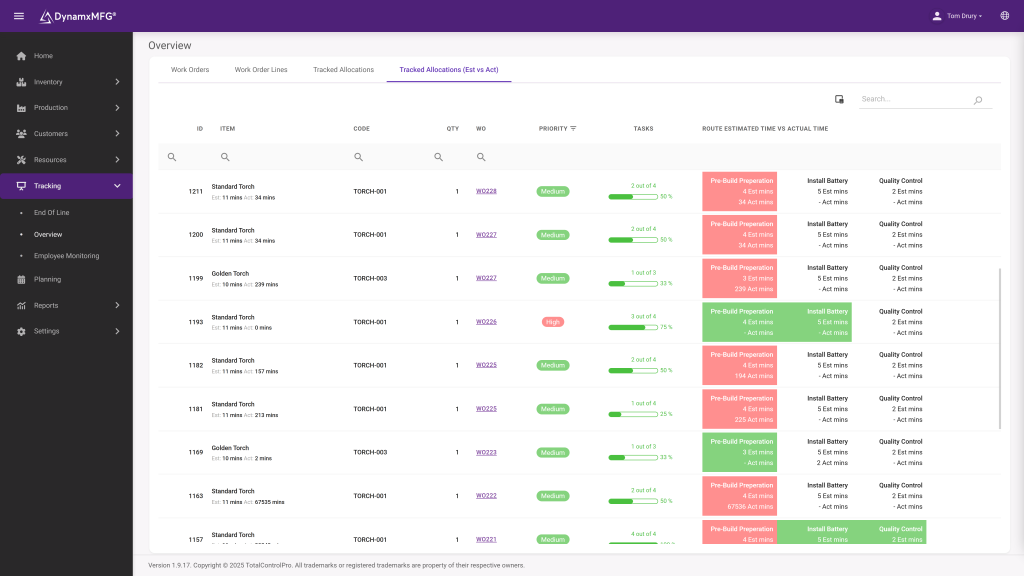
See every job running over estimate before it becomes a problem
Every operation has an estimated time built into the routing. As operators track against it, DynamxMFG compares actual time to estimate in real time. Operations on target show green. Operations running over show red. You see the problem while there is still time to act.
The Tracked Allocations view breaks down estimated versus actual time across every active work order – by operation, by employee, and by routing. Use it in the daily production meeting or pin it to a management screen.
“DynamxMFG has significantly eased our start-up growing pains. We’ve really enjoyed working with the team and see huge potential in the software to support our growth as we scale.”
Kristopher S
Service Engineer at Protea
“As GMC has grown, it had become harder for me to have such a keen view on components to see if those parts were profitable or not. DynamxMFG enabled us to monitor the machine time and see whether we’re making a profit or a loss on each component.”
Paul B
Managing Director at GMC
“We chose the system over competitors because of its ease of use, strong customer support, and friendly delivery team. So far, everything has matched what was promised and the experience has been very positive.”
Amy M
Head of Operations at Elite Skills Arena
“DynamxMFG has significantly eased our start-up growing pains. We’ve really enjoyed working with the team and see huge potential in the software to support our growth as we scale.”
Liam M
Head of Operations at Maeving
“The ability to dynamically modify BOMs after release, adding or removing items from work orders, scrapping, and reworking parts, has been the single biggest improvement for our business.”
Andrew T
Managing Director at Protea
“Overall, our experience has been very positive, with helpful and knowledgeable staff who work closely with us through regular meetings to tailor the software to our needs.”
Michael G
Systems Engineer at Scintam Engineering
Want to see live tracking on your operations?
Book a demo and we will show you the full tracking interface – touch screen, scan mode, and the live EOL display – with your own operations.